Baofeng UV-B5 · Volume 3
Baofeng UV-B5 — Vol 3: Programming
Earlier-generation Baofeng workhorse
3.1 Programming workflow
Programming cable. Standard Baofeng USB programming cable with the Kenwood K-1 / K-2 two-pin plug — same cable as the F8HP ↗ and most other Chinese dual-band HTs. Known-good versions use genuine FTDI FT232RL; clones use Prolific PL-2303 (often counterfeit — Windows driver headaches) or CH340 (works on Linux out of the box; needs the CH340 driver pack on Windows). Prefer the FTDI-genuine cable — about $20 mid-2026 from BTECH vs. $5-8 for clones; the driver pain you save the first time something goes wrong pays the difference in one session.
Software: CHIRP. CHIRP is the answer for the UV-B5 — the driver (uvb5.py) was added in the early 2010s; CHIRP still flags it as experimental, and it talks to the radio at 9600 baud. See Vol 3 (Programming software landscape) for the full CHIRP context. BaoFeng’s own factory program, “UV-B5 - PC Software” version 1.09 (program files dated 2012-09-22), is the only factory version found; it survives as a copy on Miklor, since BaoFeng’s download pages no longer list the UV-B5. Its Test Mode changes the power alignment and is best left alone. The factory software, CHIRP and the paid RT Systems alternative are listed at https://radios.fubsypoly.com/downloads/#baofeng-uv-b5.
CHIRP version matters. Use a recent CHIRP build (CHIRP-next, the rolling release that replaced the old stable releases in 2022). Older CHIRP versions (pre-2018) had known channel-name corruption bugs on the UV-B5 — writing certain characters could scramble adjacent channel names. Fix is running current CHIRP; install via the platform installer at chirpmyradio.com.
Codeplug structure. The UV-B5 codeplug is the simple 99-channel flat list — no zones, no groups, no contacts, no roaming. Each channel has:
- Frequency (RX) and TX offset (split + sign for repeaters, or zero for simplex)
- Channel name (5-character display name — CHIRP’s driver sets
NAME_LENGTH = 5) - Power level (high / low)
- Bandwidth (narrow 12.5 kHz / wide 25 kHz)
- CTCSS / DCS encode and decode
- Skip flag (skip this channel on scan)
- BCL (busy-channel lockout) on / off
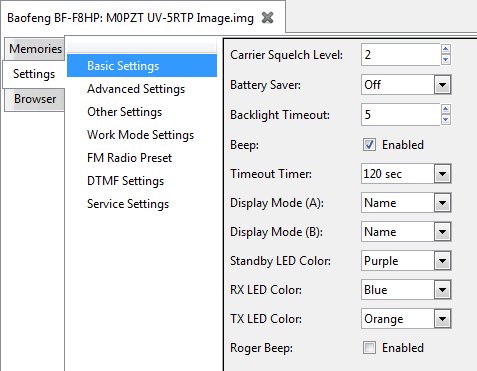
Plus a global settings page with VOX, dual-watch, beep on / off, squelch level, backlight timeout, transmit timeout (TOT), and the radio’s name display. That is the entire codeplug — small enough to import / export as a CSV from CHIRP in a few seconds, simple enough to backup as a binary .img and restore later without surprises.
Workflow.
- Plug in cable, identify the COM port (Device Manager on Windows;
dmesg | grep ttyorls /dev/serial/by-id/on Linux). - Open CHIRP, read from radio (Radio → Download from radio → Baofeng → UV-B5).
- Save the read-back as
uv-b5-YYYYMMDD-baseline.imgimmediately — this is your recovery point. - Edit channels in the spreadsheet view, or import a
.csvof channels from somewhere like RadioReference. - Sanity-check the channel list — frequencies in valid ham allocations, offsets and tones correct for any repeaters.
- Write to radio (Radio → Upload to radio).
- Save the final codeplug as
uv-b5-YYYYMMDD.imgfor archive.
Firmware version check. The CHIRP UV-B5 driver expects specific firmware version strings to identify the radio. If CHIRP cannot detect the radio (gives “unrecognized model” or hangs at the model-detect step), check the firmware version in the radio’s menu (typically menu item 40 or similar — TBD verify against the unit). CHIRP has a single UV-B5 driver (uvb5); no separate “uvb5_old” driver exists in either the CHIRP-next or the legacy build, so a detection failure is a cable, port or CHIRP-version problem rather than a matter of picking a different driver.
3.2 Codeplug backups
Storage location. Keep codeplug files in a per-radio folder, following the same convention as the F8HP ↗ codeplugs. Naming convention: uv-b5-YYYYMMDD[-tag].img for the binary image (CHIRP-native, byte-for-byte round-trippable), and the matching .csv export for human-readable diffing.
Backup cadence. Low — this is a legacy unit that doesn’t change configuration often. Read-and-save the codeplug:
- After any session that edits channels (one save at the end is fine)
- Before swapping the battery (the radio’s RAM is battery-backed; an extended battery-out condition can lose settings on some Baofeng firmware revisions — verify on the UV-B5 by checking the codeplug after a battery swap)
- Before any service work — note that no UV-B5 firmware update has ever been published (none on BaoFeng’s, BTECH’s or Miklor’s download pages), so there is no firmware to flash
- Once a year as a baseline hygiene practice
Restore. Full-image write through CHIRP — open the saved .img, then Radio → Upload to radio. The radio’s entire codeplug is overwritten; no partial / merge restore. This is the right behaviour for the UV-B5’s flat-channel-list architecture.
Comments (0)