WiPhone · Volume 3
WiPhone — Vol 3: Configuration & Firmware
Open-hardware ESP32-based SIP/VoIP phone
3.1 SIP/VoIP configuration
The WiPhone is a SIP user agent (in IETF RFC 3261 terms — a SIP UA, a softphone-class endpoint) running over Wi-Fi. To make a call, it needs three things: a Wi-Fi association to a network with internet access, a SIP account (server URL + username + password), and a far-end SIP URI to dial. With those, it acts like any softphone — registers with the SIP server, places and receives calls, exchanges RTP audio in both directions.
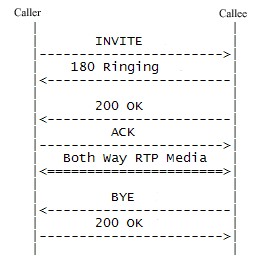
Wi-Fi setup. The device-side configuration is via the on-device menu: SSID selection, password entry on the T9 keypad (slow, since it’s a phone keypad not a QWERTY), WPA2 personal supported. WPA3 support is TBD — the ESP32-WROOM-32 has WPA3 in newer SDK builds, but whether v0.4 firmware enables it is unknown; verify against the on-device association behaviour with a WPA3-only network. Enterprise Wi-Fi (WPA2-EAP / 802.1X) is not supported in stock v0.4 firmware. Wi-Fi-band: 2.4 GHz only, since the ESP32-WROOM-32 has no 5 GHz radio — see Antennas Vol 1 for the broader “internal Wi-Fi antenna is enough for short-range applications; no external RF necessary” framing that applies here.
SIP account setup. The procedure is documented at length in ../manuals/wiphone/Setting up SIP Accounts — v0.4rc1 documentation.pdf. The fields that matter:
- SIP server / domain — the host the WiPhone registers against (e.g.
atlanta.voip.ms,chicago.voip.ms, your Asterisk box’s hostname or LAN IP, etc.). - Username / extension — assigned by the SIP provider or your PBX (e.g.
1234567_userfor VoIP.ms,1001for an Asterisk extension). - Password — the SIP password (separate from the provider’s web-portal password, in the VoIP.ms case; same as the extension secret in an Asterisk box).
- Outbound proxy — optional, used when the SIP server is behind a NAT or when a provider mandates it; most providers don’t need it.
- Registration interval — how often the WiPhone re-registers; default is typically 600 seconds, which is fine for any normal use.
- Codec preference — G.711 µ-law (the universal interoperable codec, ~64 kbps), G.711 a-law (European variant), GSM (low-bandwidth, ~13 kbps, lower quality), OPUS (modern, variable rate, best quality but TBD on v0.4 firmware support — verify against the on-device codec list).
The WiPhone supports multiple SIP accounts simultaneously (the v0.4 docs reference up to 4 stored accounts, switchable per-call) — useful for keeping a personal SIP, a work SIP, and a JMP.chat SIP-to-XMPP bridge all configured at once.
Provider compatibility. Tested-good provider list from community reports:
Table 1 — Provider compatibility. Tested-good provider list from community reports
| Provider | Notes |
|---|---|
| VoIP.ms | The default reference. $1.50/month per DID + per-minute or unlimited plans. Works cleanly with the WiPhone’s G.711 codec. |
| Twilio (Programmable Voice) | Works as a SIP endpoint; Twilio’s SIP trunking adds per-call cost on top of DID rental. |
| OnSIP | Free-tier SIP-to-SIP within the OnSIP user base, paid for PSTN. |
| Asterisk (self-hosted) | The hacker’s choice. Run Asterisk or FreePBX in a VM or on a Pi; the WiPhone is then a desk extension on your own PBX. Zero per-call cost. |
| FreePBX | The GUI on top of Asterisk; same SIP semantics, friendlier configuration. |
| JMP.chat | SIP-to-XMPP gateway; routes incoming SIP calls to your XMPP account. Niche but interesting for crossing protocols. |
| 3CX, Sangoma PBXact | Commercial PBXs; the WiPhone registers as a standard SIP extension. |
Call quality. G.711 over a reasonable Wi-Fi link sounds essentially identical to PSTN — no surprises. Jitter and packet loss on a marginal Wi-Fi link cause the usual artefacts (clicks, brief dropouts, the occasional warble). The WiPhone has no acoustic echo cancellation worth speaking of in v0.4 firmware — handset use is fine; speakerphone use in a hard-walled room produces noticeable echo to the far end. The Calls and Messages PDF documents the on-device call workflow (placing, answering, holding, transferring) at the level needed for end-user training.
SMS / messaging. SIP MESSAGE method is supported on some firmware revisions for in-band SMS between SIP endpoints — TBD on the current firmware, and dependent on the SIP provider supporting it on the back end. Don’t plan around SMS as a core feature.
STUN / NAT traversal. SIP behind NAT is the classic problem (the SIP signaling carries the IP/port for the RTP media stream, which gets rewritten by NAT). The WiPhone supports STUN configuration for NAT traversal — set the STUN server (Google’s stun.l.google.com:19302 works for casual use; your SIP provider may offer their own) and the WiPhone learns its public IP/port and inserts it into SIP messages. For symmetric-NAT networks, even STUN doesn’t help — you need TURN or an outbound proxy. Most home routers do cone NAT and STUN works fine; corporate networks vary.
3.2 Firmware updates
The WiPhone firmware is an Arduino sketch (WiPhone.ino), built in the Arduino IDE with the vendor’s WiPhone Arduino core (board package 0.1.2, installed through the Boards Manager) — not an ESP-IDF project. The vendor publishes the source as downloadable zips rather than on GitHub (0.8.27 and 0.8.30 are the source versions found; the 0.8.32 source has not been published), under the WiPhone Public License v1.0, which permits redistribution with the licence text. The Firmware Updates PDF in ../manuals/wiphone/ documents the user-facing workflow. Every vendor build found (0.8.9a beta and 0.8.23 through 0.8.32), both source releases and the Arduino core are archived, with checksums and flashing notes, at https://radios.fubsypoly.com/downloads/#wiphone.
OTA (Over-the-Air) updates. Over-the-air updating was added in firmware 0.8.24. The controls are under Menu → Settings → Firmware settings (Check / Install). The phone reads a small INI file (version= and url= lines) from the vendor’s server and installs the image it points to; as of September 2026 the server offers 0.8.32, the newest build. The phone installs a server image only when it is newer than the installed version, so OTA cannot downgrade, and no rollback feature is documented. A failed OTA update is not retried until the server’s version number changes; the Reset button in Firmware settings clears the failed-version flag and restores the default server URL. The vendor’s Custom Firmware Server page describes pointing the phone at a self-hosted INI (the server’s certificate chain goes into the phone’s SPIFFS as user.pem). Vendor release cadence is slow and release dates are not published.
Wired updates (USB). The vendor documents two wired paths, neither needing a special key sequence: uploading directly from the Arduino IDE, or writing prebuilt binaries with Espressif’s Flash Download Tool (SPI mode DIO, 40 MHz, 128 Mbit flash). The full vendor image is five files — bootloader at 0x1000, partition table at 0x8000, boot_app0.bin at 0xe000, the application at 0x10000, SPIFFS at 0xc90000 — and a routine update writes only the application image at 0x10000. Writing the SPIFFS image erases SIP accounts, the phonebook and settings. An esptool.py equivalent (not from WiPhone documentation) is:
esptool.py --chip esp32 --port /dev/ttyUSB0 --baud 921600 write_flash \
    0xe000 boot_app0.bin 0x10000 WiPhone-phone-0.8.32.ino.bin
Including boot_app0.bin is a precaution not stated by the vendor: a phone that has taken an OTA update may be booting from the second application slot, and boot_app0.bin resets the selector so the freshly written image runs. The ESP32’s ROM bootloader cannot be overwritten by a bad application image, so an interrupted write is recovered by writing again. If no serial port appears, the fix is the CP210x USB driver and a data-capable (not charge-only) cable.
Building from source. Install the Arduino IDE, add the WiPhone board package through the Boards Manager (it fetches the Espressif toolchain it needs), open WiPhone.ino from a vendor source zip, select the WiPhone board and partition scheme per the vendor’s Programming Instructions, and Upload. The firmware has its own application architecture (real-time tasks, the SIP stack, the audio codec drivers, the display driver, the keypad scanner), so one-off tweaks are manageable but deep modifications (new daughter-board drivers, new codecs, a replacement SIP stack) are a project.
Repositories and community copies. The GitHub repositories cited in earlier write-ups — HackEDA/wiphone-firmware, Hong-Kong-Districts-Info/wiphone-firmware, HackEDA/wiphone-hardware and wiphone/wiphone-hardware — return 404 (checked September 2026). The vendor’s official GitHub organisation is ESP32-WiPhone, whose wiphone-firmware repository is an empty placeholder (“Currently nothing here, just a place to keep track of issues”). Community repositories built from the vendor source exist (for example mulfyx/wiphone-lab, ACKspace/WiPhone_build, Nikguy321/wiphone-meshtastic), but none is a vendor release.
Firmware version on the bench unit. TBD — verify on-device. The installed version is shown as “Device version” under Menu → Settings → Firmware settings (vendor user manual); each application image also carries the string Ver. <version>.
Comments (0)