Tecsun PL-880 · Volume 4
Tecsun PL-880 — Vol 4: Reference
Premium shortwave portable with SSB + hidden firmware features
4.1 Tips and tricks
The PL-880 ships with a hidden firmware-feature menu unlocked by special key combinations during specific operations. The community has documented these comprehensively; the canonical reference is the Tecsun PL-880 Hidden Features PDF at 02-inputs/manuals/tecsun-pl880/Tecsun-PL-880-Hidden-Features-Firmware-8820-v1.0.pdf. TBD — verify which specific firmware revision is installed on the bench unit; the hidden-feature key sequences vary between firmware versions, and the list below is for the v8820 revision which is common but not universal.
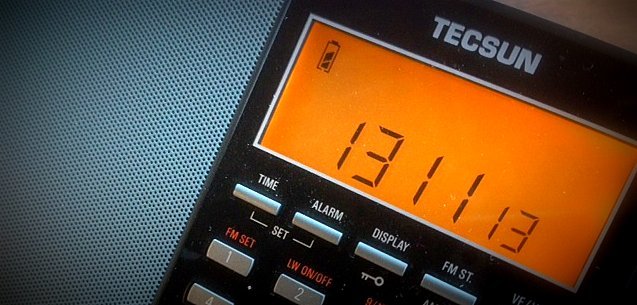
4.1.1 Display the firmware version
With the radio switched off, press and hold [AM BW] until all display segments light; hold [AM BW] again to show the 4-digit firmware version, and again to show its date (SWLing Post, 2013; Radiomuseum). Only two versions are documented: 8819 (2013, with soft-mute and SSB faults) and 8820 (dated 2013-11-13), plus a silent 2015 revision that kept the number 8820. Tecsun Radios Australia stated in 2018 that 8820 is final and no updates are planned; no later firmware (for example a post-2019 revision adding an SSB step-mode toggle) is documented. Record the version; the PDF lists hidden features per firmware revision.
4.1.2 Enter the hidden-feature menu
With the radio powered off, press and hold [LSB] (or [USB] on some firmware revisions), then press [POWER]. The display shows a hidden-feature index or a number (e.g. 01, LL, SF) depending on firmware. Use the main tuning knob to scroll through hidden features; the fine-tune knob (or numeric keypad) adjusts the value. Press [POWER] to save and exit.
TBD — verify the exact key sequence on the specific bench unit. The published lists give 10+ hidden features but the access combination varies; the safest approach is to consult the firmware-version-specific PDF before trying combinations, since some failed attempts can reset memory or trigger a configuration mode that requires a factory reset to escape.
4.1.3 SSB fine-tuning calibration
Hidden feature SF (Step Frequency) toggles between 10 Hz and 1 kHz steps on the fine-tune knob during SSB. The default on most firmware is 10 Hz which is the right answer for amateur HF SSB; some units ship with 1 kHz default which makes SSB fine-tuning useless. Verify after a factory reset.
A related hidden feature on later firmware: BFO calibration offset — applies a global frequency-offset correction to compensate for the master oscillator’s drift. If your USB ham contacts consistently sound 200-400 Hz off-pitch even with the fine-tune centered, this is the cure. Set the calibration offset to compensate for the observed pitch error.
4.1.4 AGC threshold per band
Hidden features in the AGC range adjust the AGC attack/release time constant and the threshold at which AGC begins compressing. For AM broadcast SW, the default fast AGC is right; for SSB or weak-signal AM, switching to slow AGC reduces the breathing/pumping artifacts that the default AGC creates on signals with deep fades. Different firmware revisions expose different sets of AGC options — the Hidden Features PDF lists which apply to your specific firmware.
4.1.5 External antenna sensitivity
The radio auto-detects when something is plugged into the 3.5 mm external antenna jack and switches the front-end gain. Counterintuitively, the internal whip can be more sensitive than an external long-wire in a high-RFI environment because the external antenna picks up more noise alongside more signal. If switching to a long-wire reduces apparent SNR in a noisy urban setting, try the experiment of unplugging it and using the whip — sometimes the whip wins. The right cure for that scenario is a noise-rejecting active loop (Antennas Vol 15) not a longer wire.
A separate hidden feature on some firmware revisions disables the front-end attenuator that engages with external antennas, restoring full gain. Use carefully — the attenuator is there to prevent overload from strong signals, and disabling it can cause front-end IMD products that show up as ghost stations across the band.
4.1.6 Tuning step setup per band
Defaults: MW 9 or 10 kHz, SW 1 or 5 kHz, FM 25/50/100 kHz, SSB 10 Hz (fine) or 1 kHz (coarse). The MW step must match the regional plan — 9 kHz outside the Americas, 10 kHz inside — and a unit set wrong misses every other channel. The SW step is operator preference: 1 kHz catches off-grid broadcasters, 5 kHz is faster but skips them. For amateur HF SSB, 1 kHz main + 10 Hz fine is the right combo.
4.1.7 Time stations and bandscanning shortcuts
WWV/WWVH (5/10/15 MHz, also 20 MHz from WWV; 2.5 MHz from WWV at lower power) broadcast time pips around the clock from US standards stations in Colorado and Hawaii. CHU (3.330 / 7.850 / 14.670 MHz) does the same in French and English from Canada. These stations are useful daily references — they confirm the radio’s calibration (the WWV/CHU carrier should be exactly on the nominal frequency when the fine-tune is centered) and verify propagation conditions (which time stations are audible at a given hour tells you which HF bands are open).
The PL-880’s ETM mode is the fastest way to find what’s active in a SW broadcast band right now. Tune to the broadcast band of interest (e.g. 9.400-9.900 MHz for 31 m), press [ETM], wait 30-60 seconds for the sweep, then scroll through the auto-stored channels. The result is a session-local list of every active signal on the band, which is more useful than a printed schedule in identifying the actual on-air state of broadcasters who shift slot timings without notice.
4.1.8 Recovering from a botched hidden-feature attempt
If a hidden-feature combination puts the radio into an unfamiliar state, power off, then power on with no keys held. This usually returns to normal operation. If the radio is stuck in a hidden-feature menu or shows persistent garbage on the display, try a soft reset (power off, hold [POWER] for 10 seconds). The nuclear option is a factory reset, which wipes all memories — the cure is worse than the disease unless the radio is genuinely bricked. Avoid hidden-feature experimentation when far from a backup of your memory presets.
4.2 Firmware and software on this site
The PL-880 has no user-installable firmware and no PC software, so the site’s download archive has nothing to offer for it. Firmware 8820 is the last version; changing firmware requires Tecsun’s factory programmer, connected inside the radio.
4.3 Resources
4.3.1 Manuals (locally cached)
02-inputs/manuals/tecsun-pl880/— directory holding:- Tecsun PL-880 official user manual (English, v1.0)
- Tecsun PL-880 v2 user notes (community-compiled annotations)
- Tecsun PL-880 Hidden Features (Firmware 8820 v1.0) — the canonical reference for hidden firmware menus (
Tecsun-PL-880-Hidden-Features-Firmware-8820-v1.0.pdf)
4.3.2 Vendors
- Anon-Co (US distributor, the canonical retailer for Tecsun in North America; ships factory-fresh stock with US-compatible documentation): https://www.anon-co.com
- Tecsun Radios Australia (Australian distributor with detailed product pages and support documentation): https://www.tecsunradios.com.au
- Tecsun (manufacturer, China): limited direct-sale presence; usually through regional distributors
4.3.3 Community
- The SWLing Post (the dominant SWL blog; tagged PL-880 archive with reviews, firmware updates, hidden-features documentation, accessory recommendations): https://swling.com/blog/tag/tecsun-pl-880/
- SWLing Post PL-880 Hidden Features article (the original community compilation; updated periodically): https://swling.com/blog/2014/03/the-tecsun-pl-880-hidden-features-list/
- Yahoo / Groups.io Tecsun PL-880 group (slowly declining but still has accumulated firmware notes and modification archives)
- RadioReference SWL forums (general SWL technique applicable to any portable): https://forums.radioreference.com
4.3.4 Schedules, frequency references, and time stations
- Eibi shortwave schedule (Eike Bierwirth’s quarterly broadcaster database, free): https://www.eibispace.de
- Aoki shortwave schedule (Japanese-maintained alternative, free): http://www1.s2.starcat.ne.jp/ndxc/
- PrimeTime Shortwave (US-oriented English-program filter): https://www.primetimeshortwave.com
- World Radio TV Handbook (WRTH) — historically the canonical printed annual; ceased print 2022, digital editions intermittent
- NIST WWV / WWVH / WWVB (Fort Collins CO, Kauai HI): https://www.nist.gov/pml/time-and-frequency-division/time-distribution/radio-station-wwv
- NRC CHU Canada: https://nrc.canada.ca/en/certifications-evaluations-standards/canadas-official-time
4.3.5 Cross-references (this project and siblings)
- Vol 1 (Overview) — series navigator; PL-880 row in the lineup table
- Vol 9 (Xiegu X6100) — the transceiver comparator; same RX spectrum but TX-capable
- Vol 12 (Midland WR120) — the other RX-only radio in the lineup (weather alerts vs SWL)
- Vol 3 (Programming Software Landscape) — the PL-880 sits as the “front-panel only” outlier
- Vol 4 (Frequency Planning) — the SWL frequency landscape (broadcast bands, time stations, amateur HF allocations)
4.3.6 Antenna cross-references (sibling Antennas deep dive)
- Antennas Vol 10 (Random-wire/EFHW) — DIY wire-antenna construction for external HF receive on the PL-880
- Antennas Vol 15 (Receive-only loops) — YouLoop, MLA-30+, K9AY, PA0RDT mini-whip — the indoor/apartment-friendly antenna options that pair best with the PL-880
- Antennas Vol 16 (BALUNs/UNUNs) — the 9:1 UNUN for random-wire feed, the 49:1 UNUN for EFHW feed
- Antennas Vol 29 (Use-case Matrix) — per-radio antenna recommendations including the PL-880’s row
Comments (0)