Xiegu XPA125B · Volume 4
Xiegu XPA125B — Vol 4: Reference
100W HF/6m amp with built-in antenna tuner
4.1 Tips and tricks
4.1.1 ALC cable is non-negotiable for SSB
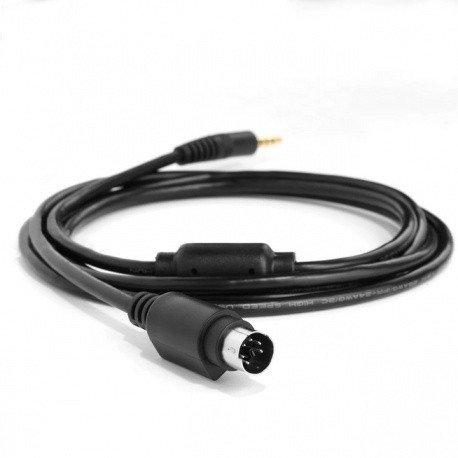
Without ALC, the rig’s audio compressor will routinely overshoot the amp’s linear region on voice peaks, generating IMD that splatters into adjacent frequencies. The fix is a $5 cable. Build the ALC cable first, before you even attempt SSB at full power. The cable’s pinout is in the XPA125B manual and the X6100 manual; verify both ends before powering up the first time. (Pin-out specifics — TBD: verify against the unit and the X6100 service manual.)
4.1.2 Use CAT for band-data, not RF auto-sense
CAT-driven band switching is instant and accurate; RF auto-sense takes 100-300 ms of carrier presence to detect the band, during which time the amp passes drive through the wrong band filter — which can momentarily distort and (in pathological cases) damage the filter. Wire up the CAT line; the few minutes of cabling pay off forever.
4.1.3 Set fan mode to AUTO, not ALWAYS-OFF
Sounds obvious, but the menu lets you do it. Some users disable the fan thinking they’ll get quieter operation — and then thermal-trip on a 30-second CW transmission and wonder what happened. Don’t.
4.1.4 Tune at low power, transmit at full
Drop drive to ~10-20% before pressing TUNE. The tuner finds the same match at any power level, and tuning at 100 W is gratuitous heating. After the match is found, bump the drive back up and transmit normally.
4.1.5 Watch the temperature on long digital sessions
A small thermometer probe (or just a finger after the fan stops) on the heatsink during a long FT8 run will tell you whether you’re approaching thermal trip. If the heatsink is hot enough that you can’t keep a finger on it for 5 seconds (~50-55 °C), back off to 50-70 W and let it recover. Better yet, drop to 50 W at the start of the session and don’t worry about it.
4.1.6 The built-in tuner has limits — keep an external tuner in the kit
For random-wire antennas, EFHW configurations near band edges, or any setup where SWR routinely exceeds 3:1, an LDG AT-200ProII or MFJ-993B downstream of the amp will tune what the internal tuner can’t. See Antennas Vol 17 (Antenna tuners) for the full external-tuner deep dive. The internal tuner is great for the 80% case; the external tuner is the backup for the other 20%.
4.1.7 Turn the amp OFF, not standby, when leaving the bench
Standby still draws ~0.5-1 A (relays plus front panel). Power-off draws zero. For overnight, weekend, or any extended off-time, hit the switch. The amp boots in ~2 seconds; there’s no reason to leave it powered.
4.1.8 Don’t power-cycle until the fan stops
After a long transmission, the fan runs for 30-60 seconds to shed residual heat. Wait for it to stop before flipping the power switch. Cutting power while the heatsink is still 60+ °C and trapping the heat with no airflow can stress the LDMOS junction.
4.2 Firmware and software on this site
The site archives every XPA125B firmware release found (V2.0.0 builds 013 and 014, and V2.0.1) and the terminal program used to load them, each with its README and checksums, at https://radios.fubsypoly.com/downloads/#xiegu-xpa125b. No Xiegu updater utility exists; firmware goes over XMODEM-1k from a terminal program.
Table 1 — Firmware and software on this site
| Product | Recommended release |
|---|---|
| XPA125B firmware | V2.0.1 (2025-01-14) — XPA125B only, not the XPA125 |
| Tera Term (XPA125B updater) | 4.96 |
4.3 Resources
Manuals:
- Xiegu XPA125B operator’s manual —
../manuals/xiegu-xpa125b/(PDF; covers front-panel operation, menu reference, DIP switches, ALC pinout, troubleshooting). The manual ships with the unit; if missing, downloadable from Xiegu’s official site.
Vendor and distributor:
- Xiegu official site (CN/EN): https://www.xiegu.eu/?p=xiegu-xpa125b (EU distributor mirror)
- Radioddity (US distributor): https://www.radioddity.com/products/xiegu-xpa125b
- Ham Radio Outlet (US retailer): https://www.hamradio.com (search “XPA125B”)
Community and reviews:
- eHam reviews: https://www.eham.net/reviews/view-product?id=14017
- Reddit r/amateurradio + r/amateursatellites threads on XPA125B (search “XPA125B” + “ALC cable” or ”+ X6100” for the high-signal threads)
- QRZ.com forums — Xiegu user group thread
- YouTube — Frank K4FMH, Walt KZ1X, and a handful of POTA-focused channels have multi-part XPA125B reviews and setup walk-throughs (especially the X6100 + XPA125B integration cable build)
Related volumes:
- Vol 1 (Overview, decision graph)
- Vol 9 (Xiegu X6100) — the matched drive radio
- Vol 3 (Programming software) — cross-software view of the Xiegu ecosystem
- Vol 4 (Frequency planning) — band-by-band operating plan
- Antennas Vol 5 (Feedlines) — coax loss math at 100 W
- Antennas Vol 6 (Single-band dipoles)
- Antennas Vol 7 (Multi-band & specialty dipoles)
- Antennas Vol 10 (Random wire & end-fed)
- Antennas Vol 16 (BALUNs and UNUNs)
- Antennas Vol 17 (Antenna tuners)
- Antennas Vol 20 (Grounding)
- Antennas Vol 29 (Use-case Matrix)
- Antennas Vol 31 (Regulatory & RF Safety) — MPE calculations at 100 W
Comments (0)